Unlocking Elegance: A Practical Guide to Using the Delighter Font
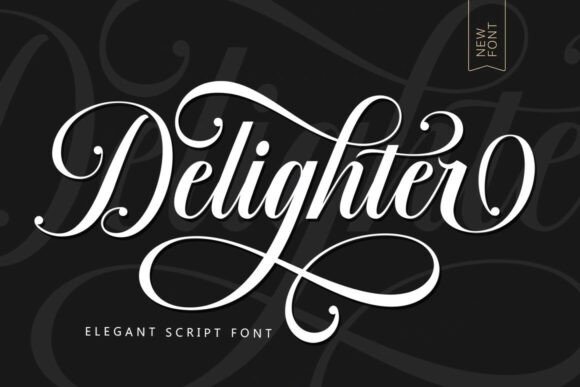
In the world of typography, few things capture attention quite like a well-designed script font. The Delighter font stands out as a prime example of this artistry, offering a blend of classic elegance with a modern, clean touch. It is a visually appealing typeface characterized by its feminine qualities, fancy letter connections, and high readability—traits that are often difficult to find in decorative scripts. For designers, entrepreneurs, and hobbyists alike, Delighter offers a versatile solution for projects ranging from wedding invitations and restaurant menus to fashion branding and editorial layouts.
However, possessing a high-quality font is only half the battle. The true challenge lies in implementation. Many users, from seasoned professionals to enthusiastic beginners, often make critical errors when selecting and applying script fonts like Delighter. These mistakes can undermine the very elegance the font is supposed to convey, leading to poor communication, wasted resources, and a lackluster final product. To help you navigate the nuances of this typeface, we have outlined the most common pitfalls and how to avoid them, ensuring your designs look as polished as intended.
The Readability Trap: Overlooking Legibility at Small Sizes
One of the most frequent misunderstandings regarding script fonts is the assumption that "easy to read" translates to "readable at any size." While Delighter is designed with attention to detail to maximize legibility, it is still a script font with intricate connections and flourishes. A common mistake occurs when designers apply this font to long-form body copy or small-print legal disclaimers. Even with a clean design, the delicate strokes of Delighter can become muddy or indistinguishable when scaled down too far, particularly on low-resolution screens or standard print paper.
The Impact: When text becomes difficult to decipher, the user experience suffers immediately. For a business owner creating a menu or a marketer designing a brochure, illegible text can cause frustration, leading customers to disengage or misunderstand the message. It reflects poorly on the brand’s professionalism.
The Solution: Treat Delighter as a display or accent font, rather than a workhorse for paragraphs. Use it for headers, logos, pull quotes, or single-line accents where the beautiful character variation can shine without compromising clarity. For body text, pair it with a clean, high-contrast sans-serif or serif font. Before finalizing a design, always print a test page or view it on a mobile device to ensure the specific size you are using maintains its integrity.
Contextual Mismatch: Forcing Elegance into the Wrong Theme
Typography sets the emotional tone of a project. Delighter possesses a distinct personality—it is elegant, fancy, and inherently romantic. A significant error in design thinking is applying this font to projects that require a rugged, industrial, or hyper-casual aesthetic. For instance, using Delighter for a construction company logo or a heavy metal music festival poster creates a cognitive dissonance for the viewer. The font’s "feminine" and "classic" attributes will clash violently with the subject matter.
The Impact: This mismatch confuses the audience and dilutes the brand message. Instead of looking sophisticated, the design can appear unintentional or even satirical. It wastes the potential of the font, which is best suited for aspirational and romantic contexts.
The Solution: Analyze the emotional resonance of your project before selecting your typeface. Delighter is an excellent choice for wedding stationery, makeup branding, boutique fashion labels, and high-end novels. If your project involves technology, automotive repair, or extreme sports, you are likely better off choosing a geometric sans-serif or a bold slab serif. Match the font’s personality to the product’s promise.
The Spacing Oversight: Ignoring Kerning and Tracking
Because Delighter features fancy letter connections and variable character widths, it relies heavily on the spacing between letters (kerning) to look correct. A frequent oversight, particularly among those new to design software, is accepting the default spacing provided by the software without adjustment. Script fonts often require manual kerning to ensure the connections between letters feel natural rather than forced or gapped.
The Impact: Poor spacing can make a premium font look cheap. If letters are too tight, the elegant loops and tails will collide, creating a blob of ink. If they are too loose, the "connected" nature of the script is broken, and the word looks disjointed. This disrupts the "visually appealing" flow that defines the font.
The Solution: Never trust default tracking blindly. Zoom in on your headline text and manually adjust the spacing between specific letter pairs. Pay special attention to combinations like "To," "Ty," or "Wa," which often create awkward gaps in scripts. Use the font’s natural connections as your guide—the goal is a smooth, unbroken rhythm that mimics natural handwriting.
Technical Troubles: Licensing and File Formats
In the rush to start a creative project, many users overlook the technical logistics of font acquisition. A common mistake is downloading Delighter from unauthorized free-font repositories. These sites often host outdated versions of fonts, stripped of essential OpenType features, or they violate licensing agreements. Furthermore, beginners often struggle to install the font correctly, failing to realize that the "fancy letter connections" (ligatures and alternates) often require specific software support (like Adobe Illustrator or Photoshop) to be accessed via the Glyphs panel.
The Impact: Using pirated or low-quality files can lead to legal issues for commercial projects. More practically, you may find that the font doesn't render correctly, missing the very stylistic alternates that make Delighter special. You might spend hours wondering why your text looks plain, only to realize you aren't accessing the full character set.
The Solution: Always purchase or download fonts from reputable foundries or marketplaces. Read the license agreement to ensure it covers your intended use (e.g., print vs. web, number of users). When you install the font, take the time to explore its full potential. Open your design software's character map or glyphs panel. You will likely find that Delighter includes alternate swashes and tails that allow you to customize the start and end of words, adding that extra layer of sophistication to your logo or invitation.
Final Thoughts on Mastering Delighter
Delighter is more than just a collection of letters; it is a tool for communication that carries a specific weight and elegance. Its design allows it to bridge the gap between traditional stationery aesthetics and modern digital needs, making it a valuable asset for anyone looking to add a touch of class to their work.
By avoiding these common mistakes—prioritizing legibility, matching the context, adjusting spacing, and ensuring proper technical setup—you can fully leverage the potential of this typeface. Whether you are a freelancer designing a logo for a fashion boutique, a bride-to-be crafting wedding invitations, or a marketer creating upscale packaging, using Delighter correctly ensures your message is not just seen, but felt. Take the time to treat the font with the same care it was designed with, and your results will undoubtedly reflect that attention to detail.