Simple Signature: Your Guide to Choosing and Using This Sweet Handwritten Font
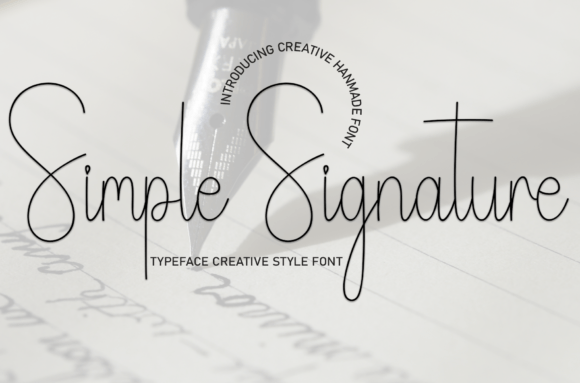
There’s an undeniable magic to a font that feels personal. In a world of rigid, uniform text, a typeface that mimics the natural flow of a pen on paper can instantly inject warmth, personality, and a human touch into any project. This is precisely the allure of Simple Signature, a sweet and friendly handwritten font designed to be cute, fun, and incredibly approachable. Its flowing, casual letterforms make it a go-to choice for wedding invitations, greeting cards, social media graphics, and any design that craves a touch of whimsy. But even with such a versatile and charming font, the difference between a stunning design and a cluttered, unreadable mess often comes down to understanding a few key principles.
The journey with a font like Simple Signature begins with a common oversight: assuming its playful nature means it can be used everywhere. A designer might fall in love with its personality and decide to set an entire project’s body text in it. This is where the first, and perhaps most critical, mistake occurs. Handwritten fonts, by their very nature, are designed for impact and short bursts of personality, not for sustained reading. Their irregular baselines, varying letter sizes, and decorative swashes, while beautiful, create visual noise that tires the eye quickly. Using Simple Signature for a long paragraph in a brochure or a blog post’s main content will sacrifice readability for style, frustrating your audience and undermining your message. The better approach is to treat it as a highlighter, not a foundation. Pair it with a clean, simple sans-serif or serif font for body text. Use Simple Signature for headlines, pull quotes, or call-to-action buttons where its charm can shine without causing fatigue.
Beyond the Aesthetic: Ensuring Readability and Clarity
Even when used for short text, a critical evaluation of legibility is often skipped. The very features that give Simple Signature its character—the looping ‘e,’ the stylized ‘r,’ or the connected ‘st’—can sometimes resemble other letters when viewed at small sizes or from a distance. This is particularly problematic in contexts like wedding invitations, where a guest’s name must be perfectly clear, or on product packaging, where a brand name needs instant recognition. A common pitfall is falling for the overall flow without testing the specifics. For instance, a capital ‘L’ might look like a fancy ‘S’ to someone unfamiliar with the font’s quirks. The solution is simple but non-negotiable: always conduct a legibility test. Before finalizing a design, print it out or view it on a mobile device at the intended scale. Ask someone unfamiliar with the project to read it back to you. If there’s any hesitation or misreading, consider adjusting the letter spacing, increasing the font size slightly, or even choosing a different, more legible font for that particular element.
The Subtlety of Context and Pairing
Another frequent misstep is a mismatch in tone. Simple Signature is explicitly sweet and friendly. Pairing it with a stark, industrial-themed design or a corporate business report creates a jarring dissonance that confuses the viewer. The font’s personality clashes with the project’s intended message, making the final product feel unprofessional or incoherent. Think of it like wearing a party dress to a board meeting; each is appropriate in its own context, but together they send the wrong signal. To avoid this, let the project’s core message guide your font choice. Is the goal to convey elegance, seriousness, or cutting-edge modernity? If so, Simple Signature might not be the right tool. If the goal is to evoke warmth, celebration, approachability, or a handmade feel, then it’s an excellent candidate. Better yet, create a mood board for your project. Does the playful energy of the font complement the colors, imagery, and overall vibe you’re building? This alignment is what separates cohesive, professional design from a collection of nice-looking but disjointed elements.
Furthermore, the technical details of acquiring and using the font are frequently overlooked in the excitement of seeing it in action. Many users download a free version of a font without checking the license. Simple Signature, like many quality fonts, is often available under specific licensing terms. Using a personal-use-only font for a client project, a commercial logo, or merchandise you intend to sell is a serious legal and ethical breach that can lead to costly disputes down the line. The corrective step here is diligence. Before downloading, always click through to the source and read the license agreement. Is it for personal use only? Does it require a paid license for commercial projects? Reputable font marketplaces and foundries make this information clear. Investing a few dollars in the correct license is not just about legality; it’s about supporting the designers who create the tools we love and ensuring you have full, worry-free rights to use your work.
Practical Application and Final Checks
Once you have the correct license and a clear plan for its use, the final stage is about refinement. A common mistake in applying Simple Signature is neglecting typographic controls. The default line height (leading) and letter spacing (tracking) are often too tight for a flowing script, causing ascenders and descenders to collide and words to look cramped. Similarly, using all caps with a handwritten font can destroy its natural rhythm, making it look awkward and forced. The remedy is to open your design software’s character panel. Experiment with increasing the line height to give the script room to breathe. Gently adjust the letter spacing to improve the overall texture. Embrace lowercase letters, which allow the font’s natural connections and flow to emerge beautifully. These small tweaks are what elevate a design from merely using a font to mastering it.
Finally, consider the user’s entire experience. A beautiful script on a website header is worthless if it’s not web-optimized. If you plan to use Simple Signature in digital projects, ensure you have a web font version (often in .woff or .woff2 formats) and that it’s properly embedded to load correctly across browsers and devices. For print projects, always convert your text to outlines or embed the font in the final PDF to avoid missing font errors at the print shop. These technical checkpoints are the unsung heroes of a flawless final product.
In the end, Simple Signature is more than just a collection of glyphs; it’s a tool for storytelling. Its value is unlocked not just by its inherent charm, but by the thoughtful, informed choices of the designer wielding it. By avoiding the pitfalls of overuse, ensuring legibility, matching context to tone, respecting licensing, and refining typographic details, you can harness its friendly, handwritten essence to create work that feels both personally crafted and professionally polished. It’s about using the right tool, in the right way, for the right job—and in doing so, making every invitation, card, or design feel genuinely special.