Magic Alphabet: A Practical Guide to Integrating Whimsical Handwriting into Your Creative Workflow
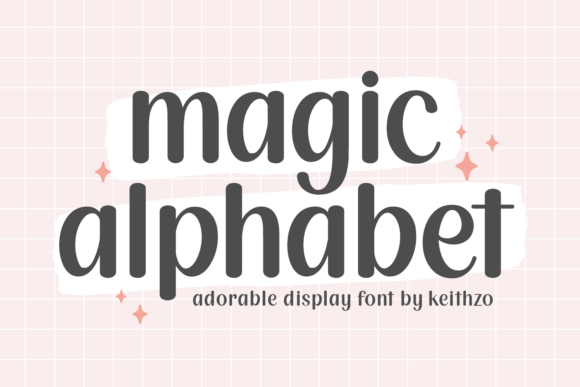
In the realm of design and product creation, typography is rarely just about legibility; it is about personality. Magic Alphabet represents a specific category of asset: the meticulously crafted handwritten font. Unlike standard serif or sans-serif typefaces that prioritize corporate neutrality, Magic Alphabet is designed to inject "endearing whimsy" into a project. For the professional creator, entrepreneur, or hobbyist, understanding how to integrate such a specialized asset into a structured workflow is essential for maximizing its value and ensuring a polished final product.
Understanding the Asset: Beyond Aesthetics
Before implementation, it is necessary to understand the functional role of Magic Alphabet within a design system. This is not a font for body text or data-heavy spreadsheets. Its utility lies in its ability to convey emotion, warmth, and a hand-crafted quality. When we describe Magic Alphabet as having "heart-filled dedication," we are referring to the vector precision of its curves and kerning. For the user, this means the font behaves reliably across different mediums without looking robotic or repetitive.
Magic Alphabet fits into the ideation and conceptualization phase of a project. When a creator is defining the voice of a brand or a specific product line, the typography sets the emotional baseline. If the goal is to create a product that feels personal and intimate—such as a gift item or a boutique accessory—Magic Alphabet serves as the primary vehicle for that sentiment. It acts as a bridge between a rough concept and a tangible feeling.
Pre-Production: Planning and Compatibility
Integrating Magic Alphabet effectively begins with preparation. A common workflow error is selecting a font after the design layout is finalized. Instead, Magic Alphabet should be introduced during the mood boarding stage. This allows the creator to align the font’s "captivating allure" with color palettes and imagery early on.
Technical Integration and Asset Management
For professionals managing large asset libraries, organization is key. Once Magic Alphabet is installed, it should be categorized within your design software (such as Adobe Illustrator, Photoshop, or Procreate) under a "Display" or "Handwritten" tag. This ensures it is easily accessible for headers, logos, and spot illustrations, but is not mistakenly used for functional UI elements where it might impede readability.
Compatibility is another critical factor. Magic Alphabet is designed to function seamlessly across standard vector and raster environments. However, when planning for physical production—such as printing on mugs or embroidering on hoodies—creators must consider the font's stroke weight. Handwritten fonts often feature varying line thicknesses. During the preparation phase, it is advisable to outline the font or test it at the specific scale of the final product to ensure that delicate swashes do not disappear or bleed together during the manufacturing process.
Production Workflows: Application Across Mediums
The true versatility of Magic Alphabet is revealed during the execution phase. Its utility extends across a diverse range of products, each requiring a slightly different workflow approach.
Print-on-Demand and Merchandise
For creators utilizing print-on-demand (POD) platforms for tote bags, pouches, or cellphone cases, Magic Alphabet serves as a focal point for the design. Because these items are often viewed from a distance or held in the hand, the "whimsy" of the font adds perceived value. A practical workflow tip here is to pair Magic Alphabet with simple graphic elements. Because the font carries significant visual weight and personality, surrounding it with too much clutter can dilute its impact. Use it for a central slogan or a name, allowing the "endearing" nature of the letters to stand out against a solid or subtly textured background.
Three-Dimensional Objects and Figurines
When designing for three-dimensional objects, such as custom figurines or sculpted mugs, the workflow shifts from 2D layout to spatial planning. Here, Magic Alphabet must be treated as a structural element. In software like Blender or ZBrush, the font can be converted into a mesh to be extruded or wrapped around a surface. The "universality" of the font’s sentiment ensures that even when wrapped around a curved mug handle, the text remains recognizable and emotionally resonant. The key process step here is distortion testing—ensuring the font maintains its "delightful charm" even when subjected to the warping required to map 2D text onto a 3D cylinder.
Workflow Integration: Before, During, and After
To fully leverage Magic Alphabet, it helps to view it as a tool that spans the entire lifecycle of a creative project.
- Before (Strategy): Use Magic Alphabet to mock up branding concepts for clients or personal projects. Its distinct style helps in pitching ideas that require a "homemade" or "artisan" aesthetic.
- During (Execution): Implement the font in the core design phase. This includes creating the master artwork for t-shirts, hoodies, and marketing collateral. The font acts as the anchor for the visual hierarchy.
- After (Marketing and Presentation): Use the font in product photography overlays, social media posts, and packaging design. Consistency in typography between the product and its marketing materials reinforces brand identity and builds trust with the consumer.
Interoperability with Other Tools
Magic Alphabet does not exist in a vacuum. It interacts with other resources and people in the creative ecosystem. For instance, when collaborating with a copywriter, it is helpful to provide samples of the font so they can tailor their headlines to fit the handwritten style. Short, punchy phrases often work best with Magic Alphabet, whereas long sentences can become visually fatiguing.
Furthermore, the font interacts with color theory and background textures. A practical observation for creators is that Magic Alphabet pairs exceptionally well with organic textures—such as kraft paper, linen, or watercolor washes. In a digital workflow, this means utilizing blending modes (like Multiply or Overlay) in Photoshop to integrate the text into the texture, making the final product look cohesive rather than "pasted on."
Quality Control and Long-Term Use
Finally, quality control is a non-negotiable step in the process. Because Magic Alphabet is a stylized font, it requires careful proofreading—not just for spelling, but for kerning and legibility. Specific letter pairings in handwritten fonts can sometimes create awkward gaps or overlaps. Creators should manually adjust the tracking between specific characters to maintain the "meticulously crafted" look described in its origin.
For long-term use, Magic Alphabet becomes a signature element of a creator’s toolkit. It is a "splendid choice" for establishing a recognizable style that audiences can identify instantly. By treating Magic Alphabet not just as a file to be installed, but as a strategic asset to be planned, tested, and integrated, creators can ensure that every project—from a simple mug to a complex figurine—carries that added touch of magic. The goal is to move beyond simply using a font and toward building a process where typography elevates the quality and emotional resonance of the final output.