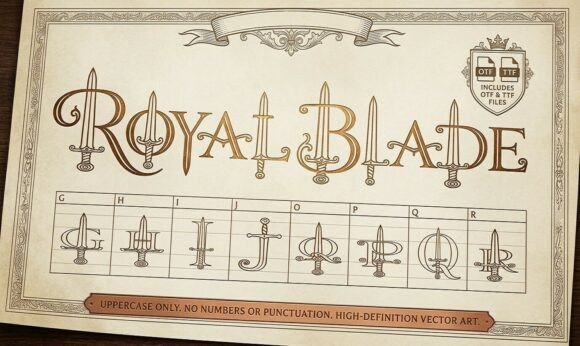
Forging a Legacy: Unlocking the Power of Royal Blade Font for Epic Designs
In the vast world of typography, few things capture the imagination quite like a font that tells a story. Royal Blade is one such typeface, a highly detailed and decorative display font where elegant typography meets medieval weaponry. Every single letter in this unique design is intricately woven with a striking sword or dagger illustration. It is designed in a clean, elegant outline style, making it incredibly eye-catching. However, the very elements that make this font spectacular are also what make it tricky to wield effectively. If you are a designer, entrepreneur, or hobbyist looking to inject a fantasy or historical aesthetic into your work, understanding how to handle Royal Blade is the difference between a masterpiece and a cluttered mess.
The Allure of the Blade: Why This Typeface Stands Out
There is a specific market for fonts that go beyond simple communication. When you are working on a gaming clan logo, an RPG campaign book cover, or fantasy apparel, standard serif or sans-serif fonts often fall flat. They lack the necessary atmosphere. Royal Blade fills this gap by providing a visual shorthand for danger, royalty, and history. It is perfect for creating striking monograms or drop caps that immediately signal to the reader that they are entering a world of high stakes and adventure.
The appeal lies in its dual nature. It functions as both a letter and an illustration. For tattoo designers or creators of epic apparel, this reduces the need for additional vector art. The typography is the art. However, many first-time users make the mistake of treating this font like a standard body typeface, leading to the first major pitfall in decorative typography.
The Cardinal Sin: Legibility Over Aesthetic
The most common mistake beginners make with highly decorative fonts like Royal Blade is prioritizing the "cool factor" over actual readability. Because every letter contains intricate dagger and sword motifs, the negative space (the open areas within and around the letters) is naturally reduced.
If you attempt to use this font at small sizes, such as for a subheading on a website or fine print on a product label, the details will merge into a dark, unreadable blob. This affects the usability and communication of your design. A logo that looks cool but cannot be read is a failed logo.
The Better Approach: Treat Royal Blade as a display or headline font only. It is designed for impact, not for paragraphs. If you are designing a book cover, use the font for the title or the first letter of a chapter (drop cap), but switch to a clean, readable serif font for the author's name or the back cover blurb. This creates a hierarchy that guides the viewer's eye without causing fatigue.
Context Mismatch: Choosing the Wrong Battlefield
Another frequent oversight is failing to match the font to the project's tone. Royal Blade carries a very specific weight—it screams "fantasy," "medieval," and "action." A misunderstanding of this context can lead to jarring design choices.
Imagine a wedding invitation for a modern, minimalist ceremony, or a corporate tech report. Using a font woven with weaponry in these contexts would be inappropriate and confusing. It undermines the professionalism of the presentation. Similarly, using it for a children's book might be too aggressive or complex for young eyes.
Practical Advice: Before downloading or applying Royal Blade, define your project's "vibe." Is it edgy? Is it historical? Is it aggressive? If the answer is yes, proceed. If the project requires trust, stability, or softness, this is the wrong tool. For example, a gaming clan logo for a strategy war game is a perfect fit. A yoga studio flyer? Not so much. Always evaluate the emotional resonance of the typeface against your message.
Technical Oversights: File Types and Editing
When working with intricate vector designs, the technical specifications matter more than you might think. A common frustration for users is downloading the font only to find that the "outline" style creates issues when they try to change colors or add effects in software like Photoshop or Illustrator.
Because Royal Blade is designed in a clean outline style, it relies on negative space. If you apply a drop shadow or a glow effect incorrectly, you risk filling in the delicate sword details, making the letter look like a heavy black square. Furthermore, if you are using this for apparel design, you need to ensure your software handles the font as vectors rather than rasterizing it immediately, which allows for scaling without pixelation.
How to Fix It: Always check the font file format. While TTF is standard, OTF (OpenType) often provides better compatibility with advanced design features. Before committing to a final design, convert your text to outlines (shapes) or smart objects. This allows you to manually adjust the "fill" and "stroke" independently. This ensures that the sword illustrations remain distinct and sharp, regardless of the background color or size.
Spacing and Pairing: The Silent Killers of Design
Typography is rarely a solo act. Royal Blade needs a partner. A major error is pairing this complex, decorative font with another stylistic font. For example, pairing it with a heavy gothic script or a grunge texture font creates visual chaos. The viewer won't know where to look.
Additionally, the default "kerning" (space between letters) in decorative fonts can sometimes be tricky. Because the sword and dagger illustrations might extend beyond the standard bounding box of a normal letter, the letters might appear to touch or overlap if placed too close together.
The Expert Solution: Follow the rule of contrast. If Royal Blade is your headline, pair it with a neutral, clean sans-serif font (like Helvetica, Roboto, or Open Sans) for any secondary text. This allows the intricate details of the blades to shine without competition.
Regarding spacing, always manually kern your headlines. Zoom in and look at the negative space between the letters. You may need to increase the tracking (overall spacing) slightly to ensure the weapon illustrations don't clash. For a monogram, you might even need to overlap the letters intentionally to create a crest, but this requires careful masking rather than just typing.
Final Checks Before You Forge Ahead
Before you finalize a purchase or a download, or before you send a design to a client, run through this checklist to ensure you are making a sound decision with Royal Blade:
- Scalability Test: Zoom out to 50% on your screen. Can you still read the word? If not, it won't work as a thumbnail for social media or a mobile header.
- Color Contrast: Test the font on both light and dark backgrounds. Outline fonts can sometimes disappear on busy backgrounds. You may need a solid shape behind the text to make it pop.
- Audience Alignment: Ask yourself if your target audience appreciates fantasy aesthetics. If your market is strictly corporate finance, this font will likely confuse them.
By avoiding these common pitfalls and treating Royal Blade with the respect a specialized tool deserves, you can create designs that are not just eye-catching, but also professional and effective. It is a font that demands space and attention—give it both, and it will serve your project well.